 Procedure for Register code
 Outline
Define data to be imported for Journal data, Claims
data and Debts data, and data to be updated for collection plan and payment
plan.
1.
Screen Display Method
- Select [Server applications] → [Data Import] → [Master Import].
- Select [Register code] from the Menu.
→ The [Register code] screen will appear.
2.
New Registration of Data
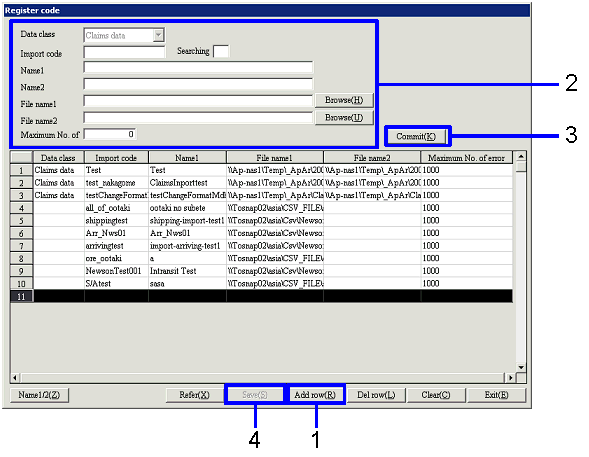
- Click the "Add row (R)" button.
- Enter information on data to be imported.
- Click the "Commit (K)" button.
→ Data entered will be displayed in the [Spread].
- Click the "Save (S)" button.
→ The data will be registered.
3.
Modifying Existing Data
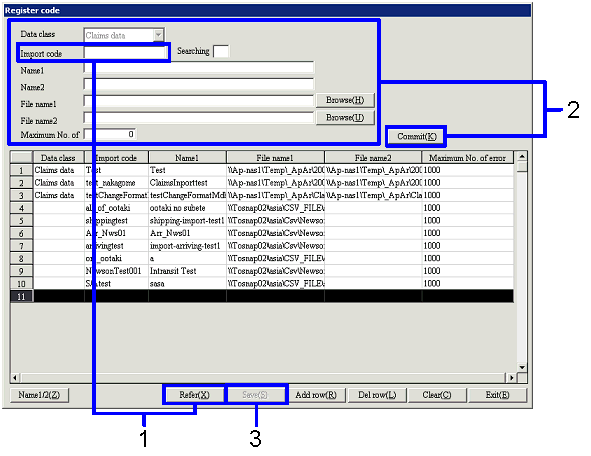
- Enter the import code for data to be modified, and click the "Reference
(X)" button.
→ Applicable data is displayed in the [Header] and [Spread].
- Modify data and click the "Commit (K)" button.
→ Modified data is displayed in the [Spread].
- Click the "Save (S)" button.
→ The data will be registered.