 Procedure for Register auto-journal pattern
 Outline
You can register journal pattern that is used
in the [Borrowings entry] screen.
1.
Screen display method
- Select [Finance] → [Borrowings control] → [Register].
- Select "Register Auto-Journal Pattern" from the menu.
→ [Register auto-journal pattern] screen will appear.
2.
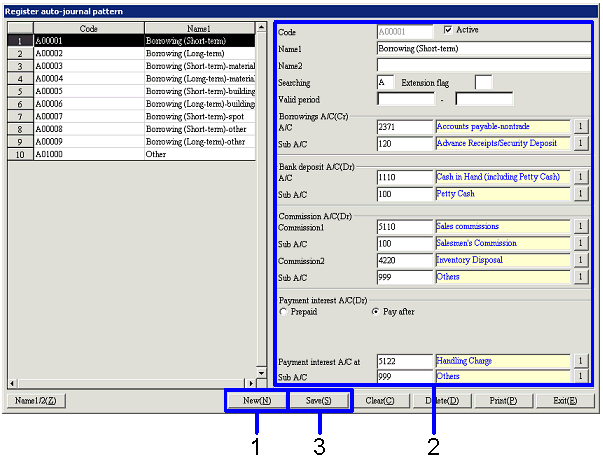
When registering new auto-journal pattern
→ To Menu Reference
- Click the "New"
button.
→ All items displayed on the right side will be deleted.
- Enter the necessary information in the items on the right side.
- After confirming the entered information, click the "Save"
button.
3.
When modifying existing auto-journal pattern
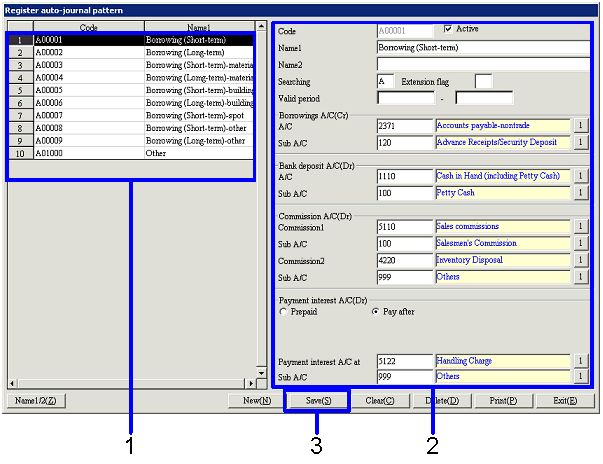
- Select the row containing the information that you want to modify in
[Spread].
→ Selected information will be displayed in the
items of the right side.
- Modify the entered information.
- After confirming the entered information, click the "Save"
button.
4.
When deleting existing auto-journal pattern

- Select
the row containing the information that you want to delete in [Spread].
→ Selected information will be displayed in the items of the right
side.
- Click
the "Delete" button.