 Procedure for Register T/F commission
 Function
outline
Function
outline
You can register T/F commission. The feature allows you to register a
combination of the range of T/F transfer amount and commission by registered financial
institution. By registering the
combination of T/F transfer amount and commission, auto-calculation will be
performed to give an amount of commission upon entry of T/F transfer
amount. You can also set up
individual T/F commission for specific banks
1.
Screen display method
- Select [Finance] → [Bank account control] → [Register].
- Select [Register T/F Commission] from the menu.
→ [Register T/F commission] screen will appear.
2.
Commission Registration
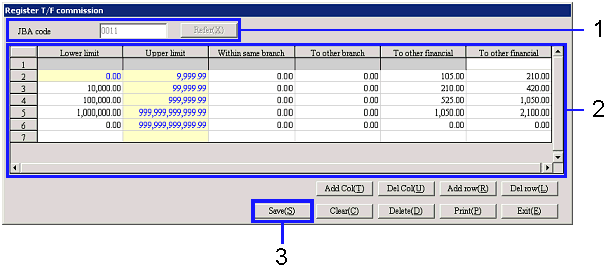
→ To Menu Reference
- Select a financial institution, using "JBA code" ("Finncl
Institutn code" in B.A.C. setup entered in [Register
financial institution]) of [Common master].)
Click the "Refer (X)" button.
- Set up "Commission" required for the T/F and the object
range of T/F transfer amount in "Lower limit." Once the next range of "Lower limit" is
set, "Maximum limit" will automatically be calculated.
Values are fixed to "0.00 (minimum)," "999,999,999,999.99 (maximum)." You cannot specify any negative
amount.
The feature allows you to register the commission by T/F Destination.
- Click the "Save (S)" button.