 Procedure for Register matching pattern by correspondent
 Function
outline
Function
outline
Registers matching patterns used as
the distinction standard in the correspondent distinction process from the "T/F
applicant name," which is performed when
[Payment/Receipt data matching]
is executed.
1.
Screen display method
- Select [Finance] → [Bank account control] → [Register].
- Select [Register Matching Pattern by Correspondent] from the menu.
→ The [Register matching pattern by correspondent] screen will be
displayed.
2.
Entering details information
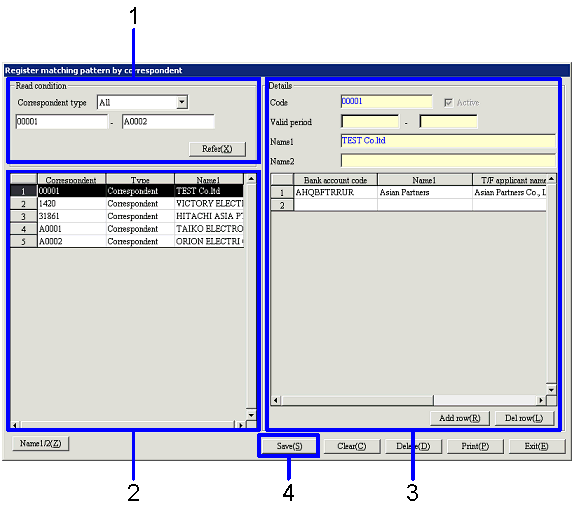
→ To Menu Reference
- Set up read conditions of "Correspondent," "Employee" and "Correspondent
group" in [Read condition].
Click the "Refer (X)" button.
- Select data to enter detail information for from correspondent/employee
displayed in the spread section.
- Enter "Bank account code" and "T/F applicant name" in the sppread
section of [Details].
- Click the "Save (S)" button.
→ Details information will be registered. You can enter detail information for another correspondent.