 Register inventory balance
Manage the inventory balance at the beginning
and end of the month and the inventory valuation unit price created in the [Update
inventory balance] process in [Closing control], by month (2 types of valuation
methods can be used).
When A.S.I.A. is implemented, register the information by department and by
month based on the content setup in "Inventory control setup" in [Register goods].
When the inventory quantity for the term inventory balance and the inventory
valuation unit price 1,2 do not match by goods, registration and updates cannot
be executed.
 Screen Transition
[Master management]
↓
[Logistics master]
↓
[Goods management]
↓
[Register inventory balance]
↓
[Register inventory balance] screen - [Term
inventory balance], [Inventory valuation unit price 1], [Inventory valuation unit price 2] tab
Item
Setup - [Term inventory balance] tab
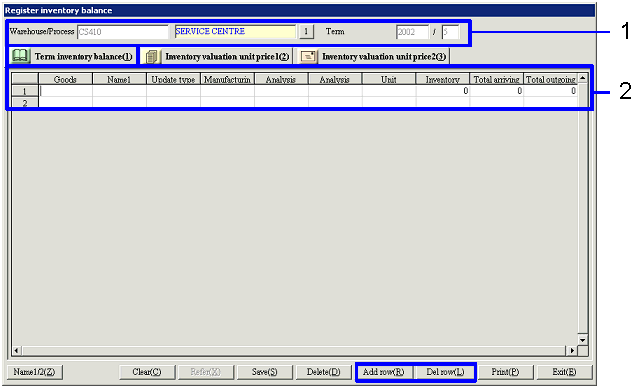
- Warehouse/Process
Dept selection
Select the warehouse/process dept and the term to register the inventory
balance.
- Term inventory balance registration
The term inventory balance for the entered
department and term will be displayed.
Changes can be made. To add
and delete rows, use the "Add row (R)" button and the "Delete row (L) button.
When A.S.I.A. is implemented, enter information such as inventory quantity.
-
Goods, Name
Enter the code of the goods selected for "Object of inventory control" in [Register goods]. The names of the goods for the codes entered will be
displayed.
For goods with the "Update inventory Qty by term" type set as "By goods" in [Register
goods], only one inventory balance data relating to the same goods for the same
term can be registered.
-
Update type
When the goods are specified, the "Update inventory
Qty by term" types setup in [Register goods] for the selected goods will be
displayed.
-
Manufacturing No.
Enter the manufacturing No. When "Required" has
been selected for manufacturing No. entry checks in [Register goods], entries will be required.
When the "Update inventory Qty by term" type is "By goods/manufacturing No.,"
the inventory balance update will be executed based on this No. Therefore, the inventory balances data
linked to the same term, the same goods, and the same manufacturing No. can
only be registered once.
-
Analysis code1, 2
Enter the analysis code1, 2. When "Required" has
been selected for "Analysis code1" and "Analysis code2" entry checks in [Register goods], entry is required.
When the "Update inventory Qty by term" type is "By goods/analysis code1" and /
or "By goods/analysis code2," the inventory balance update will be executed
based on this code. Therefore, the
inventory balance data linked to the same term, the same goods, and the same
analysis code 1, 2 can only be registered once.
-
Unit
When goods are specified, the "Unit" setup in [Register goods] for the selected goods will be
displayed.
-
Inventory Qty
Enter the inventory quantity at the time of term
inventory count in standard unit.
When this number does not match the total of "Total arriving Qty"-"Total
outgoing Qty," a message will appear.
-
Total arriving Qty
Enter the total incoming quantity for the term.
-
Total outgoing Qty
Enter the total outgoing quantity for the term.
Item
Setup - [Inventory valuation unit price 1, 2] tab

- Select the [Inventory
valuation unit price 1] tab or the [Inventory valuation unit price 2] tab
Click the tab of the valuation unit price to
register. In the [Inventory valuation unit price 1] tab, register the unit
prices to apply the inventory valuation methodIn the [Inventory valuation unit price 2] tab, register the
unit prices to apply the Inventory valuation method2.
- Register the inventory
valuation unit price
The inventory quantities of the inventory valuation
unit price 1, 2 for the specified department and term will be displayed. Changes can be made. To add and delete
rows, use the "Add row (R)" button and the "Del row (L)" button.
When A.S.I.A. is implemented, enter information such as the inventory
quantity. For goods with the
valuation methods not selected as "First-in-first out method" or "Last-in-first
out method," the same goods cannot be entered in multiple rows.
-
Goods, Name
Enter the code of the goods selected as "Object of inventory control" in [Register goods].
When the code is entered, the name of the goods will be displayed.
For goods with the "Update inventory Qty by term" type set as "By goods" in [Register
goods], only one inventory balance data relating to the same goods for the same
term can be registered.
-
Valuation method
When goods are specified, the "Inventory valuation
method1" or the "Inventory valuation method2" setup in [Register goods] for the selected goods will appear
in the tabs.
-
Cost method
When goods are specified, the "Applied valuation
method1" or the "Applied valuation method2" setup in [Register goods] for the selected goods will
appear in the tabs.
-
Unit
When goods are specified, the "Unit" setup in [Register goods] for the selected goods will be
displayed.
-
Inventory Qty
Enter the inventory quantity at the point of term
inventory update in standard unit.
-
Unit price
The valuation unit price of the goods will be
calculated and displayed based on the inventory valuation method and the
coverage cost method setup in [Register goods].
-
Amt
The "Inventory Qty" × "Unit price" will be
displayed.
Buttons
-
Name1/2
-
Clear
-
Refer
When this button is clicked, data will appear on the spread of the [Term
inventory balance] tab, the [Inventory valuation unit price 1] tab, and the [Inventory
valuation unit price 2] tab when there are applicable data for the term.
When no data applies, the quantity and unit price will be displayed as "0," and
displayed so that entries can be made.
-
Save
When the inventory quantity of the term inventory balance and the inventory
valuation unit price 1, 2 do not match in every tab by goods, data cannot be
saved.
-
Delete
-
Add row
-
Del row
-
Print
The user can specify the term and the range of the "Warehouse/Process code"
to output.
-
Exit