 Procedure for Register analysis index for cashflow
 Outline
This section explains the flow of registering the
cashflow budget analysis.
1.Screen
display method
- Select [Strategy] → [Cashflow management] → [Cashflow management].
- From the Menu, select [Register Analysis Index for Cashflow].
→ The [Register analysis index for cashflow] screen will be displayed.
2.Register
company setup
→ To Menu Reference
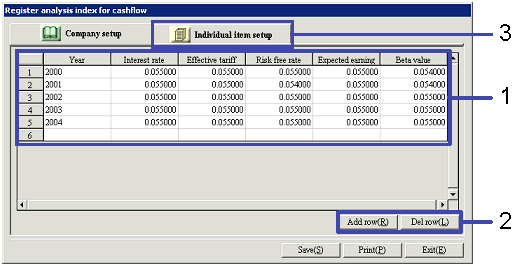
- Enter the appropriate values in "Year," "Interest
rate," "Effective tariff," "Risk free rate,"
"Expected earning rate," and "Beta value."
- When entering multpile years continuously, click the "Add row"
or "Del row" button.
Enter each year using one row.
- Click the "Individual item setup" tub.
3.Register
Individual item setup
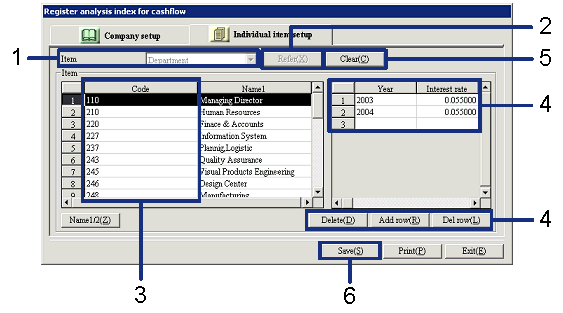
- Select an item in the "Item" field.
- Click the "Refer" button.
→ The items registered in a master will be displayed.
- Select the code of the item to be set.
→ On the right side of the screen, the columns and rows to enter "Year"
and "Interest rate" will be displayed.
- If required, click the "Delete," "Add row," or "Del
row" button to enter an index for each code.
→ If you want to enter an index for another code, the current entries
must be saved once.
- If you want to continue entering an
index for another item, click the "Clear" button to go back to Step
1.
- Lastly, click the "Save"
button again.