 Register box
Register the boxes to be used for packing
goods.
 Screen Transition
[Master management]
↓
[Logistics master]
↓
[Other management]
↓
[Register box]
↓
[Register box] screen
Item
Setup
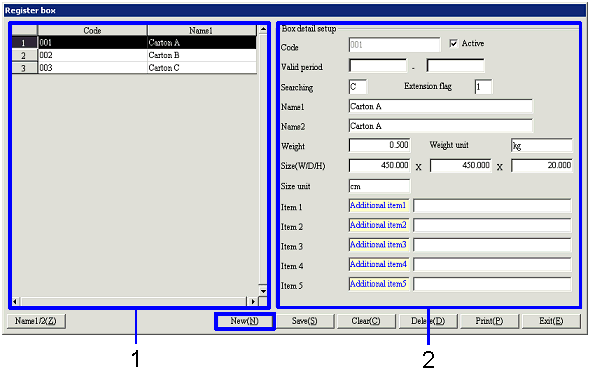
- Box selection (or new registration)
The list of boxes registered will be
displayed. Select the box to set
up. The information on the
selected box will appear on the right side of the screen.
When registering a new box, click the "New" button.
-
Code, Name
The code and name of the box will be displayed.
- Details entry
-
Code
Enter the code to use for the box. Make an entry with up to 20 single-byte numbers.
-
Active
-
Term of
validity
-
Searching
-
Extension
flag
-
Name1, 2
-
Weight
Enter the weight of the box.
-
Weight unit
Enter the units to use when weighing the box (usually
kg).
-
Size (W/D/H)
Enter the size of the box with the "Width × Depth ×
Height" format.
-
Size unit
Enter the units to use when measuring the box.
-
Item 1-5
Enter additional information. The
names displayed can be changed in [Additional
information name setup] of the [System custodian].
Buttons