 Procedure for Register securities type
 Function
outline
Function
outline
Register the type of the securities valuation
method. You can register types by
layer.
1.
Screen display method
- Select [Assets] → [Investment
securities] → [Register].
- Select [Register Securities Type] from the menu.
→ The [Register securities type] screen is displayed.
2.
New registration
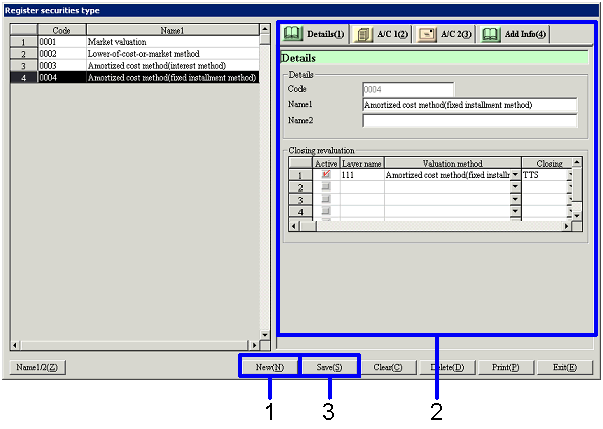
→ To
Menu Reference
- Click the "New(N)" button.
- Enter data for the valuation method.
Enter more data into the items on the [A/C 1], [A/C 2] and [Additional
information] tabs.
- Click the "Save (S)" button.
→ The registered type information is displayed on the left-hand side
of the screen.
3.
Modifying
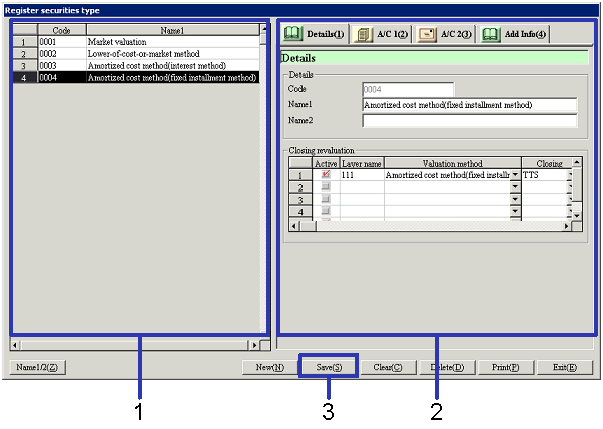
- Select securities type information to be modified from the left-hand
side of the screen.
→ The details of the data to be modified are displayed in the [Details].
- Modify the data.
- Click the "Save(S)" button.
→ The modified type information is saved.