 Register project code 1,2
Register project code 1,2
Project codes can be used as custom summary
codes in accounting subsystems.
For example, using custom codes for summary is useful for cases involving more
than one department such as sales promotion campaign expense. Budget for each project can also be
registered in budget registration of [Planning control module]. [Register project code 1] and [Register
project code 2] have no difference in the functions, purposes of use and
operation. Use [Register project
code 2] to register more than one project code.
 Screen
Transition
Screen
Transition
[Master management]
↓
[Common master]
↓
[Other management]
↓
[Register project code 1], [Register project code 2]
↓
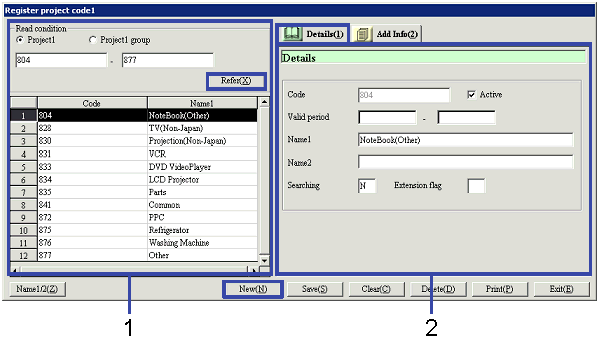
[Register project code 1] screen, [Register
project code 2] screen – [Details] tab, [Additional
information] tab
Item
Setup - [Details] tab
Item
Setup - [Additional information] tab

Buttons