 Register currency
Register currencies to use in A.S.I.A.
→ Currency
 Screen transition
[Master management]
↓
[Common master]
↓
[Currency management]
↓
[Register currency]
↓
[Register currency] screen
Item
Setup
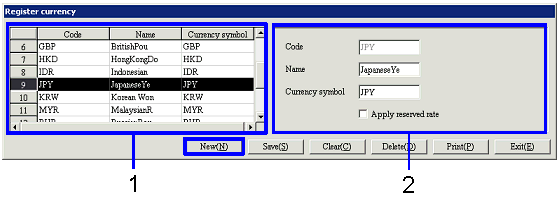
- Select currency (or
register new currency)
Currencies that have been registered are
listed. Select the currency to set
up. The information on the
currency selected is displayed on the right part of the screen.
To register a new currency, click the "New" button.
-
Code, name
The codes and names of the currencies are displayed.
- Enter details
-
Code
Enter a code for the currency. Up to three alphanumeric characters can
be entered.
-
Name
Enter the name of the currency.
-
Currency symbol
Enter the currency symbol. Up to three alphanumeric characters can
be entered.
-
Apply reserved rate
When the check box is checked, the rate on the
settle entry date is automatically applied at settle entry.
The same currency can be registered with the check box checked and unchecked,
which allows the currency to be regarded as different currencies.
Example:
Claims date: May 3 (exchange rate for the Std currency on this day is 117)
Settle entry date: June 30 (exchange rate for the Std currency on this day is
120)
With the above conditions, the rate at settle entry is 177 if "Apply reserved
rate" check box is checked, and 120 if the box is unchecked.
Buttons