 Register A/C Group
This procedure groups the A/C and sub A/C. The grouping is up to one level.
 Screen
Transition
Screen
Transition
[Master Management]
↓
[Accounting Master]
↓
[Accounting Management]
↓
[Register A/C Group]
↓
[Register A/C Group] screen – [Details],
[Register structure] tab
Item
Setup – [Details] tab

- A/C Group (or new
registration)
Displays the list of registered A/C groups. Select the A/C group to set up. Information of the selected A/C group is
displayed on the Details tab.
To register a new A/C group, click the "New" button.
-
Code, Name
Displays the code and name of the A/C group.
- Detailed Information Entry
Item
Setup - [Register Structure] tab
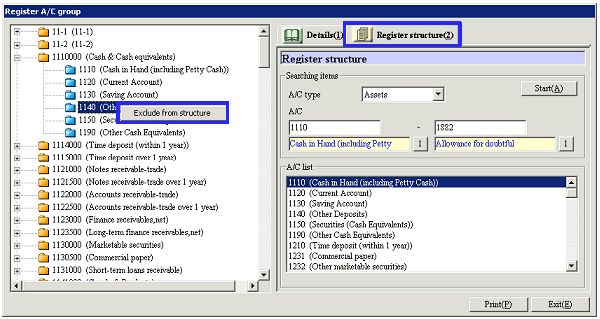
[Register A/C Group Structure]
- Select the A/C Group
Click the "Start" button to display the A/C that
meets the read conditions on the right of the screen. The list of the current structure information of the A/C
group is displayed on the left of the screen.

-
A/C Type
Select the target A/C type from "Assets," "Liabilities," "Capital,", "Cost of
sales," "Sales and general," "Non-operating expense," "Extraordinary loss," "Sales,"
"Non-operating profit," "SP gain" and "Profit adjustment (P/L)."
-
A/C
Enter the read condition for the A/C subject to registration and reference.
You can enter a range of A/C codes.
-
A/C List
Displays the list of A/Cs that meets the search criteria.
- Drag & drop the customer
from the right to the left side of the screen
Select theA/C
for which the structure is to be registered from the entered A/C group from the
right side of the screen. Drag and
drop the A/C to the folder of the A/C group on the left side of the
screen. Press the Ctrl key or Shift
key to drag and drop multiple A/Cs at once.

[Changing and canceling the A/C group structure]
- Right-Click on the A/C on
the left side of the screen
To
cancel an A/C group structure, select the A/C on the left side of the screen,
right-click the mouse and select "Exclude from structure." Alternatively, drag and drop it to the
right area on the screen.
To change the A/C group structure, cancel it once, then drag and drop it again
from the right side of the screen to the left.
Buttons