 Procedure for Register construction in progress account code
 Outline
In the [Register construction in progress
account code] screen, you can register Construction in progress codes (Project No.)
used in the Construction in progress Module. The registered Construction in progress codes can be listed
in [Spread] on the left side of the screen. In this list, you can select the Construction in progress
code to be set up. To register a new code, click the "New" button.
1.Screen display method
- Select [Assets] → [Construction in Progress] → [Register].
- From the Menu, select [Register Construction in Progress Account Code].
→ The [Register construction in progress account code] screen will be displayed.
2.New registration of Construction in progress code
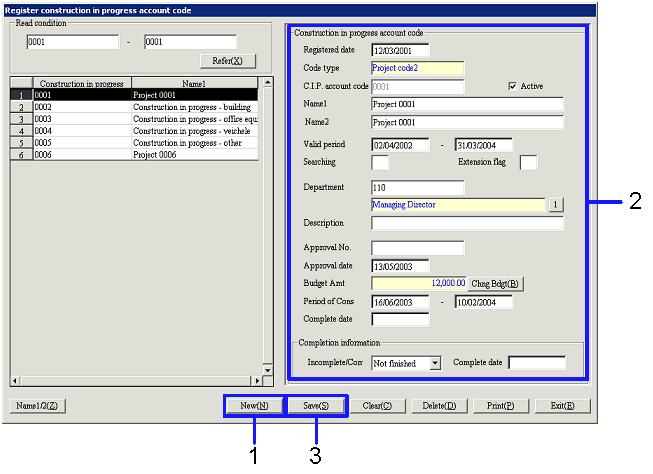
→ To Menu Reference
- Click the "New (N)" button.
- Enter the required items (Construction in progress code, Name, etc.).
In Construction in progress code, Project codes specified in Construction in progress account code type can be entered. You can change the Name if needed.
- Complete entering all of the required items, then click the "Save (S)" button.
3.1
Update Construction in progress code
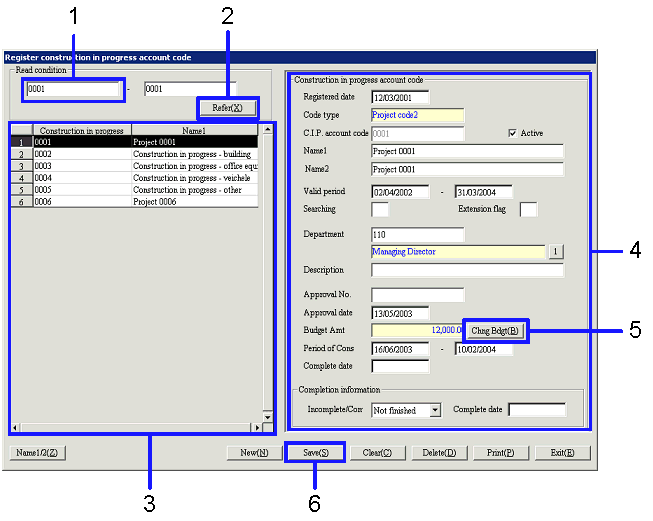
- Enter a read condition.
- After entering the read condition, click the "Refer (X)" button.
→ The list of Construction in progress codes will be displayed on the left side of the screen.
- Select a Construction in progress code to update.
→ Details of the selected Construction in progress code will be displayed on the right side of the screen.
- Modify the Construction in progress code.
- To update "Budget Amt", click the "Chng Bdgt (B)" button.
→ The [Change budget] screen will appear.
- Click the "Save (S)" button.
→ The Construction in progress codes will be saved.
3.2
Update budget
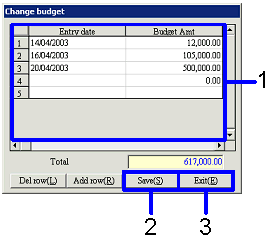
→ To Menu Reference
- Enter data in "Entry date" and "Budget Amt."
- After entering Budget, click the "Save (S)" button.
→ The value in "Total" will be updated.
- Click the "Exit (E)" button.
→ The updated amount of "Total" will be reflected on "Budget Amt" in the [Change budget] screen.