 Register project code 1,2group
Group the project codes registered. Codes can be grouped at one level.
Project codes 1 registered in [Register project
code 1] are grouped at [Register project code 1 group].
Project codes 2 registered in [Register project
code 2] are grouped at [Register project code 2 group].
 Screen
Transition
Screen
Transition
[Master management]
↓
[Common master]
↓
[Other management]
↓
[Register project code 1 group], [Register project code 2 group]
↓
[Register project code 1 group] screen, [Register
project code 2 group] screen – [Details] tab, [Additional
information] tab, [Register structure] tab
Item
Setup - [Details] tab

- Project code group (or new
registration)
Project codes that have been registered are
listed. Select the project code
group to set up. The information
on the project code group selected is displayed on the Details tab.
To register a new project code group, click the "New" button.
-
Code, name
The codes and names of the project code groups are displayed.
- Enter details
Item
Setup - [Additional information]
tab
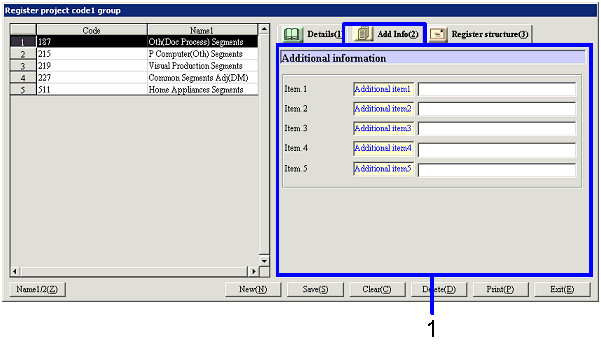
- Enter additional information
Item
Setup - [Register structure] tab
[Register project code group structure]
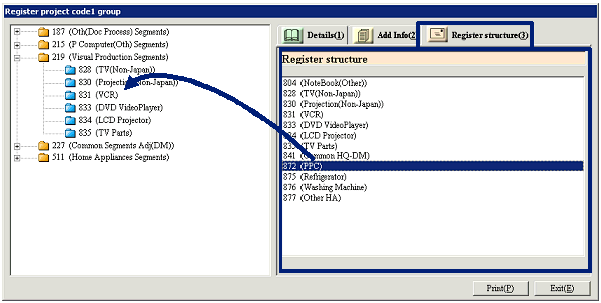
- Drag the correspondent
from the right to the left part of the screen and drop
Clicking the Register structure tab lists the
current structure information on project code groups on the left part of the
screen. The right part of the
screen lists registered project codes.
Select from the right part of the screen the correspondent for which to
register structure for the project code group specified and drag and drop to
the project code group folder on the left part of the screen. Selecting while the Ctrl or Shift key
is pressed down allows dragging and dropping more than one project code at one
time.
[Cancel or change project code group
structure]
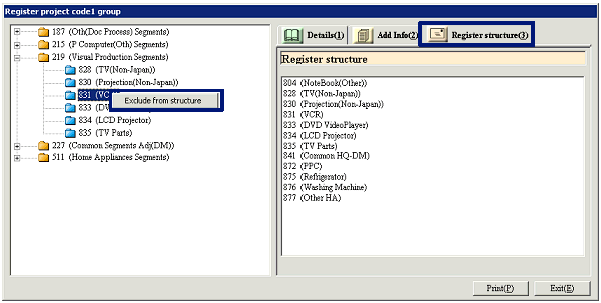
- Right-click a project code
on the left part of the screen
To cancel project code group structure, select the
project code concerned on the left part of the screen and click the right
button of the mouse and select "Exclude from structure" or drag and drop the
project code to the right part of the screen.
To change project code group structure, cancel the group structure once and
drag and drop the code again from the right to the left part of the screen.
Buttons