 Register security
In [Register security], set security credit
limits for customers (other than vendors). The warming limits and credit limits registered here can be
checked with the actual accumulated balance on charts in [Refer trial
balance sheet] of [Basic console module].
 Screen transition
[Master management]
↓
[Common master]
↓
[Trade management]
↓
[Register security]
↓
[Register security] screen
Item
Setup
[Security registration/reference]
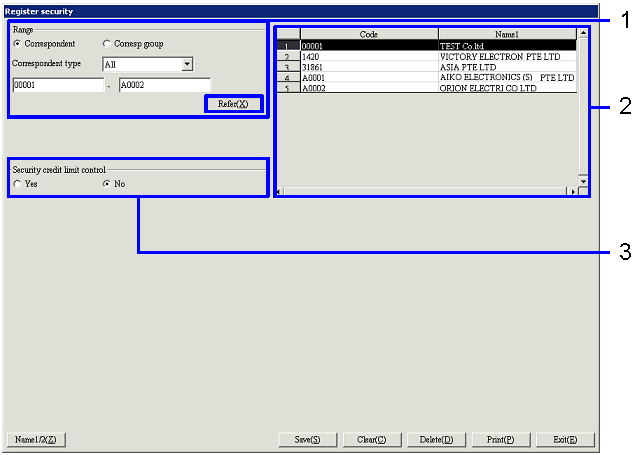
- Search for a customer
Clicking the "Reference" button lists the
correspondents in the specified range on the right part of the screen.
-
Correspondent, correspondent group,
code
Specify the range of correspondents to register or
refer to.
Correspondent:
Select this to directly search for a correspondent.
Correspondent group:
Select this option to select a correspondent group and specify a correspondent
for which structure is registered in the correspondent group.
-
Correspondent type
Select the type of correspondent to refer to from
the following options: "All," "Cust," "Cust & Vendor," "Related company." This is displayed only when the
specified range is "Correspondent."
Security registration cannot be made for correspondents with the correspondent
type "Vendor."
-
Code
Select the code according to the selection of "Correspondent"/"Correspondent
group" and "Correspondent type."
- Select Correspondent
Selecting from the correspondent list on the right part of the screen a
correspondent for which to register security displays the current registration
status in "Security credit limit control."
-
Code, name
The codes and names of the correspondents that meet
the read conditions are displayed.
- Select application of security
credit limit control
Specify whether the selected correspondent is to be
controlled.
-
Security credit limit control
Select "Yes" or "No."
Details setup is displayed only when "Yes" is selected.
Item
Setup - Details setup
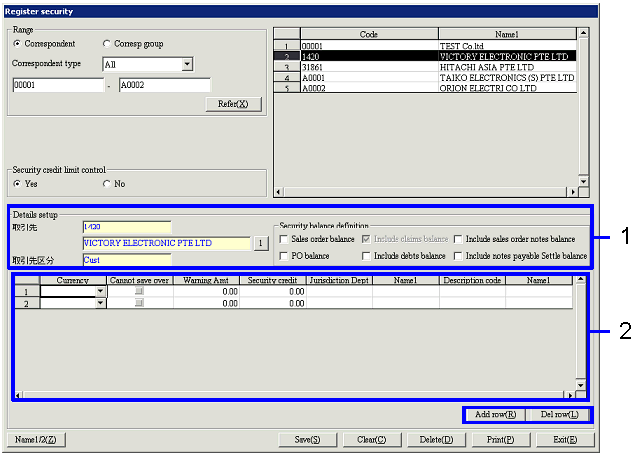
[Details setup] - Common
- Register security balance
definition
Select the type of transaction balance to be an
object of security credit limit control.
-
Correspondent, correspondent type
The code, name and correspondent type of the correspondent selected are
displayed; they are for reference only and cannot be modified.
-
Security balance definition
Select from the following options: "Sales order balance," "Include sales order
notes balance," "PO balance," "Include debts balance," "Include notes payable Settle
balance." "Include claims balance"
is always controlled.
[Details setup] – Spread
- Register security credit
limit
Register security warming and credit limits for
each currency and department. To
add/delete rows, click the "Add row"/"Delete row" button.
-
Currency
Select a currency registered in [Register currency] of [Currency management]. Using different
"Jurisdiction Dept
code" allows registration of more than one security for the same currency.
-
Cannot save over credit limit
Checking this check box disables saving of vouchers after the balance specified
in "Security balance definition" has exceeded the "Security credit limit."
-
Warning Amt
Enter a warning limit in the currency specified in "Currency." A warning message appears at saving of
vouchers when the balance specified in "Security balance definition" has
exceeded the "Security credit limit."
Amounts exceeding "Security credit limit" cannot be entered.
-
Security credit limit
Enter a security credit limit in the currency specified in "Currency."
-
Jurisdiction Dept code, name
Select a department to be included in summary of the balance specified in "Security
balance definition" from the departments registered in [Register department].
-
Description code, name
Select the description registered in [Register description] of
[Accounting master]. Names can be
entered manually.
Buttons
-
Reference
-
Name1/2
-
Add row
-
Delete row
-
Save
-
Clear
-
Print
"Correspondent type" and "Currency" can be specified for output. For "Correspondent type,"
"All," "Vendor," "Cust," "Cust & Vendor," "Related company" or "Correspondent group" can be
selected to specify the range.
-
Exit