 Register product structure (material processing)
Use the goods registered in [Register goods] to register product structures.
When "production type" is setup as "Material processing type" in [Logistics parameter setup] in the [Logistics
master module], this registration screen will appear.
This screen which is designed for "Material processing type" can configure
primary goods and subsidiary goods in a relation of N:M. It is one-tiered.
When parameter is set as "Assembly processing type," refer here.
 Screen
Transition
Screen
Transition
[Master management]
↓
[Logistics master]
↓
[Goods management]
↓
[Register product structure]
↓
[Register product structure (material
processing)] screen
Item
Setup
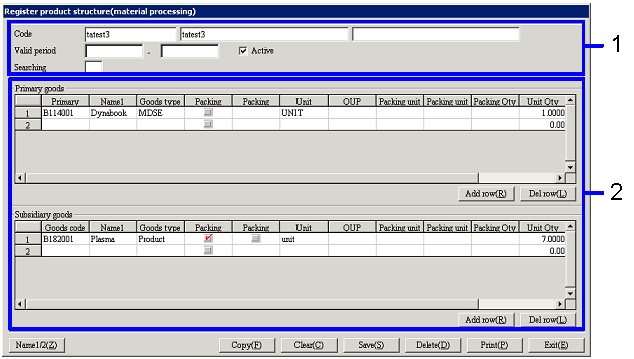
- Product structure
selection(or new registration)
When registering a new product structure, enter the "code," name, etc.
When editing registered product structures, select the "code."
- Register primary goods and
subsidiary goods
Enter the primary goods in the product structure in the [Primary goods] spread,
and the subsidiary goods in the [Subsidiary goods] spread. Click on the "Add row" button and the "Delete
row" button to add and delete rows.
-
Primary goods Code, Name(Displayed only in the primary goods spread)
Enter the code of the primary goods in the product
structure being registered.
-
Goods code, Name(Displayed only in the subsidiary goods spread)
Enter the code of the subsidiary goods in the
product structure being registered.
-
Goods type
The goods type of the goods entered will be
displayed. Changes cannot be made.
-
Packing type
When the goods entered require setup of packing
units, check-marks will be displayed.
Changes cannot be made.
-
Packing entry
When this checkbox is turned ON, the goods quantity
will be treated as packing units.
-
Unit
The unit of the goods entered will be
displayed. Changes cannot be made.
-
QUP
When the goods entered require setup of packing
units, the QUP will be displayed. Changes cannot be made.
-
Packing unit code, Packing unit name
When the goods entered require the setup of
packing units, select their packing unit type. When the code is entered, the
name of the corresponding packing units will be displayed.
-
Packing Qty
Enter this when registering the quantity of goods
by using the packing unit.
In the case of primary goods, enter "how many primary goods will be created
from the subsidiary goods" for the product structure being registered, with the
packing unit.
In the case of subsidiary goods, enter "how many subsidiary goods will be
needed to create the primary goods" for the product structure being registered,
with the packing unit.
-
Unit Qty
In the case of primary goods, enter "how many
primary goods will be created from the subsidiary goods" for the product
structure being registered, with the unit Qty. Generally, registration is done based on the concept of "how
many subsidiary goods will be needed to complete one primary good." Therefore the number entered is usually
"1."
In the case of subsidiary goods, enter "how many subsidiary goods will be
needed to create primary goods" for the product structure being registered,
with the unit Qty.
Buttons