 Procedure for Stock symbol (bond symbol, fund)registration
 Function
outline
Function
outline
Register the symbols for stocks, bonds and funds
(Register stock, Register bond, Register
fund). This section describes how to enter new symbols and how to modify
them using [Register stock] as an example.
1.
Screen display method
- Select [Assets] → [Investment
securities] → [Register].
- Select [Register Stock] from the menu.
→ The [Register stock] screen is displayed.
2.
New registration
→ To Menu Reference
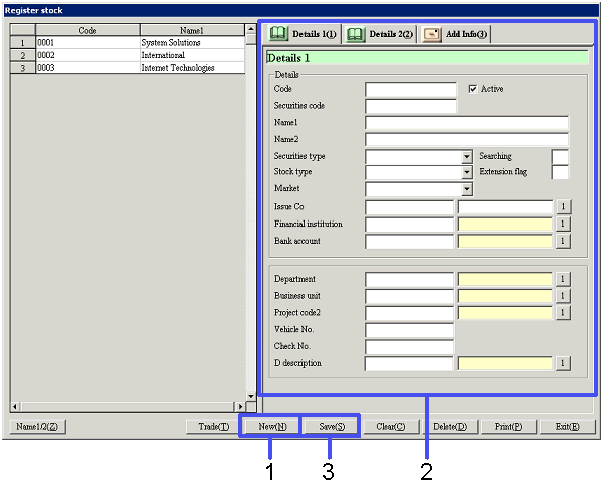
- Click the "New(N)" button.
- Enter stock symbol data.
Enter more data for items on the [Details 2] and [Additional information] tabs.
- Click the "Save(S)" button.
→ Symbol information registered is displayed on the left-hand side of
the screen.
3.
Modifying
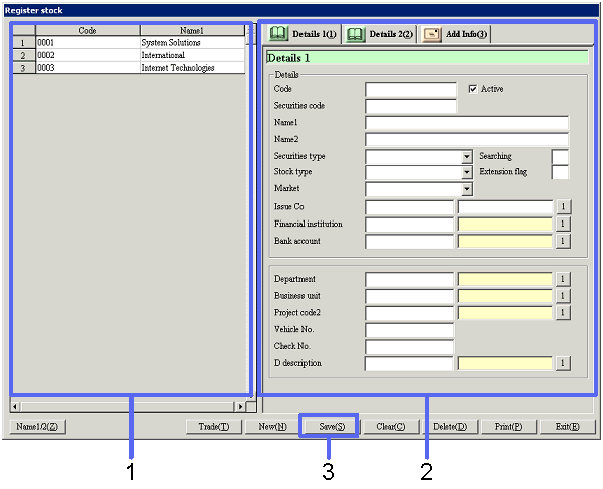
- Select stock symbol information you want to modify from the left-hand
side of the screen.
→ Details of the data to be modified are displayed in the [Details].
- Modify the data.
- Click the "Save(S)" button.
→ The modified symbol information is saved.