 Register taxable type
Register taxable types of VAT. Specifying taxable types for voucher
entry, sales subsystem, purchase subsystem, claims control module, debts
control module, etc. allows automatic calculation of taxes.
Setting "VAT control (accounting)" of [Parameter setup]
to "Yes" makes it possible to enter taxable types and taxes with vouchers,
which allows creation of basic data for VAT declaration from [VAT summary sheet
by taxable type] and [VAT detailed sheet by taxable type].
→ To Concept
of tax control with A.S.I.A.
 Screen Transition
[Master management]
↓
[Common master]
↓
[Other management]
↓
[Register taxable type]
↓
[Register taxable type] screen
Item Setup
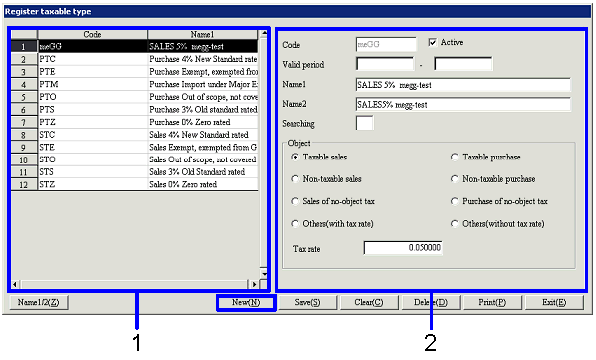
- Select taxable type (or
register new taxable type)
Taxable types that have been registered are
listed. Select the taxable type to
set up. The information on the
taxable type selected is displayed on the Details tab.
To register a new taxable type, click the "New" button.
-
Code, name
The code and name of the taxable type are displayed.
- Enter details
-
Code
Enter a code for the taxable type. Up to 20 English one byte characters can be entered.
-
Active
-
Term of
validity
-
Name 1, 2
-
Searching
-
Object
Select a taxable type from the following options: "Taxable sales," "Taxable
purchase," "Non-taxable sales," "Non-taxable purchase," "Sales of no-object
tax," "Purchase of no-object tax," "Others (with tax rate)," "Others (without
tax rate)."
The type set here narrows down the taxable types displayed as options on the
entry screen. For example, taxable
types for purchase are not displayed in the sales subsystem.
-
Tax rate
Enter a tax rate only if "Taxable sales," "Taxable
purchase," or "Others (with tax rate)" has been selected with "Object."
Buttons