 Register credit limit
Set credit limits for correspondents (other
than vendors). The credit limits
registered here can be output to forms in [Claims subsystem] and used for
credit checking in [Sales control subsystem].
 Screen Transition
[Master management]
↓
[Common master]
↓
[Trade management]
↓
[Register credit limit]
↓
[Register credit limit] screen
Item
Setup
[Register/refer to credit limit]
>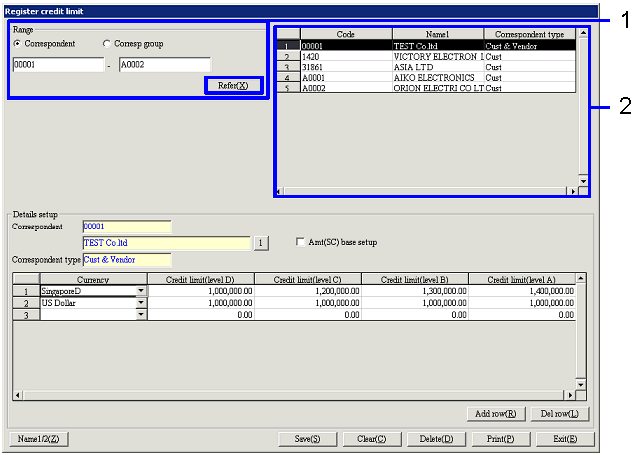
- Search for correspondents
Clicking the "Reference" button lists the
correspondents (other than vendors) that are in the specified range and with
the "Credit limit check" check box checked in [Register
correspondent] on the right part of the screen.
-
Correspondent, correspondent group,
code
Select conditions to read correspondents to
register or refer to.
Correspondent:
Select this to directly search for a correspondent.
Correspondent group:
Select this option to select a correspondent group and specify a correspondent
for which structure is registered for the correspondent group.
-
Code
Select the code according to the selection of "Correspondent"/"Correspondent
group."
- Select correspondent
Selecting from the correspondent list on the right part of the screen the
correspondent for which to register credit limit displays the current
registration status at the bottom of the screen. Nothing displayed under "Currency" means that no credit
limit is registered.
-
Code, name, correspondent type
The codes, names and correspondent types of
correspondents in the specified range are displayed.
Item
Setup - Details setup

[Details setup] - Common
- Select Std currency/entry
currency
Select the currency in which to register credit
limit.
-
Correspondent, correspondent type
The code, name and correspondent type of the correspondent selected are
displayed, which cannot be modified.
-
Amt (SC) base setup
Check the check box to register credit limit with Amt (SC).
Note that changing the setting of the check box after registration on the
spread clears the registration.
[Details setup] - Spread
- Register credit limit
Register a credit limit for each currency and
class. To add/delete rows, click
the "Add row"/"Delete row" button.
-
Currency
Select a currency registered in [Register
currency] of [Currency management].
If "Amt (SC) base setup" is ON, only the Std currency is displayed and
other currencies are not available for selection.
A currency once selected cannot be selected in another row.
-
Credit limit
Enter a credit limit for each class in each of the currencies specified in "Currency." Levels D to A correspond with D to A of
"Credit limit level" of [Class setup] of [System
custodian]. This allows setting of
credit limit for the correspondent for each operator.
Be sure to set the amount in such as way that Credit limit (Level D) ≤ Credit
limit (Level C) ≤ Credit limit (Level B) ≤ Credit limit (Level A). It is also possible to enter amounts
for D to A of "Credit limit level" with Excel and collectively copy and pasts
more than one cell.
Buttons
-
Reference
-
Name1/2
-
Add row
This button cannot be used if "Amt (SC) base setup" check box is checked.
-
Delete row
This button cannot be used if "Amt (SC) base setup" check box is checked.
-
Save
-
Clear
-
Print
Enter "Output type" and "Currency" for output.
"Output type" allows specification of the range of "Correspondent" or "Correspondent
group." When "Correspondent" is
specified, "Relation type" ("All," "Cust," "Cust & Vendor" or "Related
company") can be specified as well.
Std currency is displayed by default for the currency for output, which can be
changed.
-
Exit