 Register financial institution
Register financial
institutions to manage in operation of A.S.I.A.
Use [Register bank
account] to enter information on the accounts of financial
institutions.
 Screen Transition
[Master management]
↓
[Common master]
↓
[Trade management]
↓
[Register financial institution]
↓
[Register financial institution] screen –
[Details] tab [Additional information] tab
Item
Setup - [Details] tab
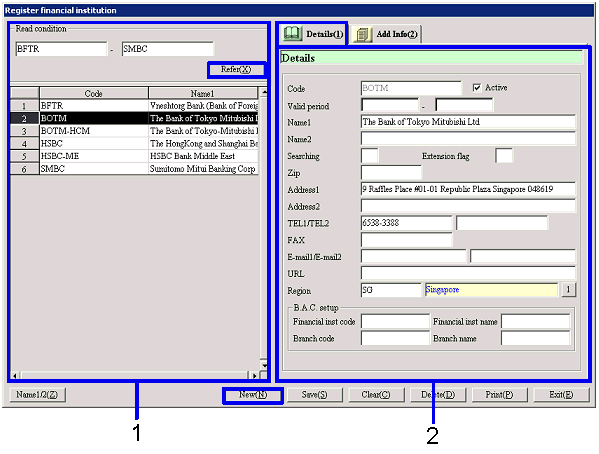
- Select financial
institution (or register new financial institution)
Clicking the "Reference" button lists the
financial institutions that meet the read conditions. Select the financial institution to set up. The information on the financial
institution selected is displayed on the Details tab.
To register a new financial institution, click the "New" button.
-
Financial institution, code
Select conditions to read financial institutions to register or refer to.
A range of financial institution codes can be specified.
-
Code, name
The codes and names of the financial institutions that meet the read conditions
are displayed.
- Enter details
-
Code
Enter a code for the financial institution. Up to 20 English one byte characters can be entered. Codes entered here are used as the
codes in financial institution masters in A.S.I.A. and not "Finncl Institutn
codes" assigned by JBA.
-
Active
-
Term of
validity
-
Name 1, 2
-
Searching
-
Extension
flag
-
Zip, address 1, address 2
Enter the zip and address of the financial
institution.
-
TEL 1/TEL 2, FAX
Enter the telephone No. and FAX No. of the financial institution.
-
E-mail 1/E-mail 2, URL
Enter the E-mail address and URL of the financial
institution.
-
Region
Enter the region to which the financial institution
belongs. Select out of the regions
registered with [Register region].
-
B.A.C. setup
If "Claims/Debts-B.A.C. interlocking" is set to "Interlock"
in [Parameter setup] of [System custodian module], the following items are
required:
-
Financial institution code
Enter the financial institution code assigned by
JBA. Up to ten English one byte
characters can be entered.
-
Financial institution name
Enter the financial institution name assigned by
JBA. Up to 20 half-sized katakana
can be entered.
-
Branch code
Enter the branch code assigned by JBA. Up to ten English one byte characters
can be entered.
-
Branch name
Enter the branch name assigned by JBA. Up to 20 half-sized katakana can be
entered.
Item
setup - [Additional information]
tab

- Enter additional information
Buttons