 Register Balance
The procedure registers the opening balance for the
A/C, sub A/C and item. You can
register the balance for the items that are set ON under "Term balance" and "Opening
balance" checkbox in [Register A/C
Property].
You can also reference the term balance updated in [Update
Accounting Balance] in the [Closing Control Module].
 Screen Transition
[Master Management]
↓
[Accounting Master]
↓
[Other Management]
↓
[Register Balance]
↓
[Register Balance] screen
Item Setup
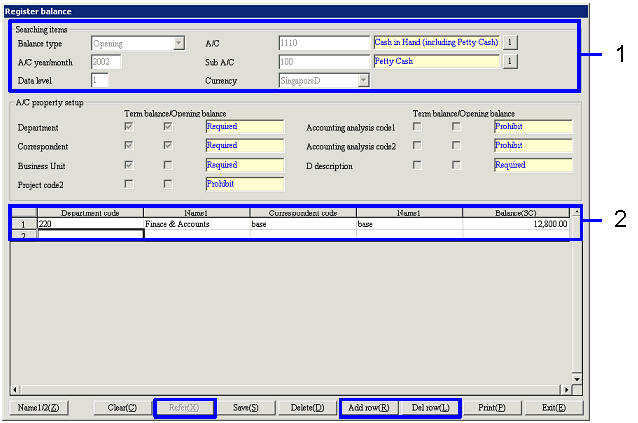
- Select A/C (or new
registration)
Click the "Reference" button to display the balance
of the A/C that meets the searching condition in the [Spread].
To register a new opening balance, enter the range and click the "Reference (X)"
button. You can only refer to the
term balance.
[Search items]
-
Balance type
Select either "Opening" or "Term."
The default display is "Opening."
If you select "Opening," the A/C that can be selected in "A/C" is B/S A/C only.
(The "A/C type" is "Assets," "Liability"
or "Capital.") Also, the "Dr side"
and "Cr side" columns are not displayed in [Spread].
P/L A/C can be selected only in "Term." However, if you enter a month that is not updated in [Update
accounting balance] of the [Closing control module], an error
occurs.
-
A/C Year/Month
Enter the accounting year and accounting term. The accounting year is mandatory. Enter the accounting term only if the balance type is set to
"Term."
For the accounting year, enter "a year prior to the current accounting
year". You can enter the "current accounting
year" and the "next accounting year" registered in [Accounting
year setup] in the [System custodian module], but if the "balance
type" is "Opening," you cannot enter the "next accounting year." If you enter a year other than the
above, an error message appears if you click the "Reference" button.
-
Data Level
Enter the data level from 1 to 20 (Required). The default is "1."
-
A/C and Sub A/C
Enter the A/C and sub A/C to register the balance (Required).
You cannot select P/L A/C if you enter "Opening" for the "balance type."
-
Currency
Select any of the currencies registered in [Register currency] or select "All
currencies."
Select "All currencies" when the A/C (A/P, etc.) is required to register the
balance in multiple currencies. Selecting "All currencies" displays the currency combo box on the left side of the
[Spread], so you can register multiple currencies at one time.
If you select "Std currency," the "Amt" field will not be displayed in the
[Spread].
- Register Balance
[A/C Property Setup]
The property of the A/C entered
on the [Searching items] is displayed by the following items. You cannot change them.
-
Department
-
Correspondent
-
Project Code 1, 2
-
Accounting Analysis Code 1, 2
-
D Description
[Spread]
Based on the update balance setup
in [Register A/C Property], the contents of A/C property are displayed in the [Spread].
For example, if the update balance setup of A/C A is "Department" and "Customer,"
each field of "Department" and "Customer" are displayed in the [Spread] and you
will be able to set up the balance for A/C A by the department and customer.
To sort a column, click the title.
The column in sorted into the following order: Currency code → Department code → Correspondent code → D description code → Project code 1 → Project code 2 → Accounting analysis code 1 → Accounting analysis code 2.
-
Currency
This is displayed only when "All currencies" is selected in [Searching items]. Select the currency for the balance in
the combo box. The default display
is Std currency.
If the entry restriction set up in
[Register A/C Property] is "Required,"
all of the following items are mandatory.
If the entry restriction is "Optional," you can register the balance
without entering the code.
-
Department code, Name
You can enter the balance for each department entered here, either according to
the department or the Warehouse/Process Dept. This is displayed only when the
"Term balance" and "Opening
balance" checkboxes for the "department" of the A/C and sub A/C selected in
[Search items] are ON. You can
also select Actual Department or Warehouse/Process Dept.
-
Correspondent code, Name
Enter the balance for each correspondent entered here. This is displayed only when the
"Term
balance" and "Opening balance" checkboxes of the "Correspondent" of the A/C and
sub A/C selected in [Search items] are ON.
-
Project code1-2, Name
Enter the balance for each project code entered here. This is displayed only when the
"Term balance" and "Opening
balance" checkboxes of the "Project code" of the A/C and sub A/C selected in
[Search items] are ON.
-
Accounting analysis code1-2, Name
Enter the balance for each accounting analysis code entered here. This is displayed only when the
"Term
balance" and "Opening balance" checkboxes of the "Accounting analysis code" of the
A/C and sub A/C selected in [Search items] are ON.
-
D description code, Name
You cannot enter a balance for D description.
-
Balance (displayed only when "A/C"
is B/S A/C and "Currency" is other than Std currency)
You can enter the balance of the foreign currency base if you have entered "Opening"
for the "balance type." If the balance
is already registered, the contents are displayed.
If you enter "Term" for the "balance type," the balance of the foreign currency
base at the term closing date you entered is displayed.
-
Balance (SC) (displayed only when "A/C"
is B/S A/C)
If you have entered "Opening" for the "balance type," you can enter the balance
of the Std currency base. If the balance
is already registered, the contents are displayed.
If you enter "Term" for the "balance type," the balance of the Std currency
base at the term closing date you entered is displayed.
The following items are displayed
only when you enter a term that has been updated in [Update
accounting balance] of the [Closing control module] and the applicable
balance is updated.
-
Increase/Decrease (displayed only
when "A/C" is P/L A/C and "Currency" is other than Std currency)
Displays the increase or decrease in the value of the foreign currency base in
the entered term.
-
Increase/Decrease (SC) (displayed
only when "A/C" is P/L A/C)
Displays the increase or decrease in the Std currency base in the entered term.
The increase or decrease is determined from "Dr A/C = Dr side - Cr side" and "Cr
A/C = Cr side - Dr side." However,
other values do not result in an error.
-
Dr side (displayed only when "Balance
type" is "Term" and "Currency" is other than Std currency)
Displays the Dr side value of the foreign currency base in the entered term.
-
Dr side (SC) (displayed only when "Balance
type" is "Term")
Displays the Dr side value of Std currency base in the entered term.
-
Cr side (displayed only when "Balance
type" is "Term" and "Currency" is other than Std currency)
Displays the Cr side value of the foreign currency base in the entered term.
-
Cr side (SC) (displayed only when "Balance
type" is "Term")
Displays the Cr side value of the Std currency base in the entered term.
[Buttons]
Timing for
Registering the Balance
- To introduce A.S.I.A. at the
start of the term
To use A.S.I.A from the start of the term,
you can start operating without registering the balance and then register the opening
balance at the point the opening balance is committed.
- To introduce A.S.I.A.
during the term (to transfer data by transfer voucher)
If the term starts on April 1, and you want
to start operating from August 1 (during the term), you can start operating by
registering the opening balance first, and then incorporate the journalizing from
April 1 to July 31 by entering all the data together by a transfer voucher.
You may reflect the transfer voucher by summarizing it into one sheet or for
each term. Depending on how you
incorporate the data, you will be able to summarize it by going back before the
start of operation on August 1.
- To introduce A.S.I.A.
during the term (to register by during-term balance)
For example, if April 1 is the start of the
term and you wish to start operating from August 1 (during the term), you can
start operating by registering the opening balance first, and then register the
mid-term balance at the point when the balance registration up to July 31 is
committed.
You may register the mid-term balance altogether in one accounting term or by
dividing it into each term. If you
register the balance by term, you will be able to summarize the term going back
before the start of the operation.
To control uncollected AR and unpaid AP before starting operation, you will
separately need to incorporate the AR or AP voucher and adjust the balance.
Instead of registering the total amount, register the fluctuating amount for the mid-term balance of B/S A/C.