 Procedure for registering auto-journal patterns
 Function Outline
In [Register auto-journal pattern], register patterns for auto-journal of notes receivables. You can set-up auto-journal patterns that match the change status of notes.
The auto-journal patterns registered here can be retrieved from "journal pattern" in the [A/C] tab on the [Notes receivable entry] screen, and from "journal pattern" in the [Bulk update notes receivable status] screen.
1. Screen Display Method
- Select [Claims] → [Notes Receivable] → [Register].
- From the menu, select [Register
Auto-Journal Pattern]
→ The [Register auto-journal pattern] screen will appear.
2. New Registration

→To Menu Reference
- Click on the "New (N)" button.
- Enter the jounal pattern code, name, and the status of the note in the [Details] of the [details] tabl
- Click on the [A/C] tab, and enter in the "Notes A/C," "Discount/Commission A/C," "Claims/Debts A/C," etc.
- Click on the "Save (S)" button.
→ the registered pattern information will display on the left side of the screen.
3. Modifying
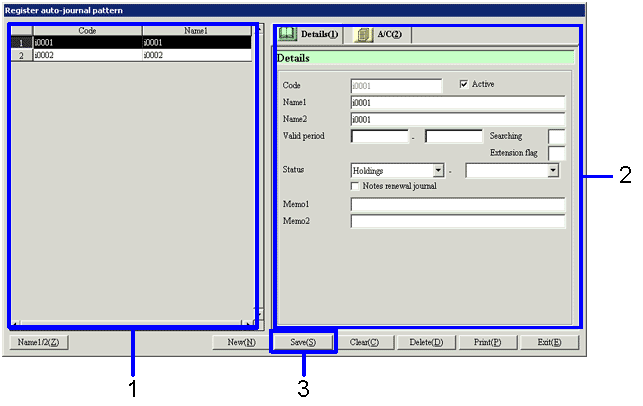
- Select the auto-journal pattern to which modifications will be made from the left side of the screen.
→ The details of the data to be modified will display
- Modify the data.
- Click on the "Save (S)" button.
→ The saved pattern information will be displayed.