 Register analysis objects (Sales/Purchase)
Register analysis objects (Sales/Purchase)
Register analysis objects to use in the "Sales order summary sheet," the "Shipping order summary sheet" and the "Sales summary sheet" in the Purchase Control Subsystem and in the "Purchase order summary sheet," the "Arriving summary sheet" and the "Purchase summary sheet" in the Purchase Control Subsystem. The analysis objects will be selected and used as column headers for the forms.
 Screen
Transition
Screen
Transition
[Master management]
↓
[Logistics master]
↓
[Other management]
↓
[Register analysis objects]
↓
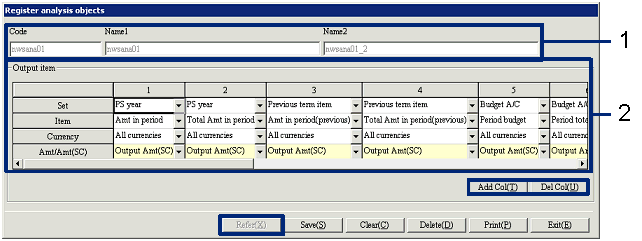
[Register analysis objects] screen
Item
Setup
Set |
Analysis objects |
Comment |
|
PS year |
Amt in period |
The total of the period (Term, Quarter, Half-year, Year) specified in the summary's output screen will be summarized. |
Total Amt in period |
The total by period segments will be
summarized for the period (Term, Quarter, Half-year, Year) specified in the
summary's output screen. |
|
|
Previous term item |
Amt in period (previous) |
Output the "output period" of the PS year for the same period the previous year. |
Total Amt in period (previous) |
Output the "Total period (from/to)" of the PS year for the same period the previous year. |
|
|
Budget A/C |
Period budget |
Output the budget data matching the "opening
budget" specified in the summary output screen. |
Period total budget |
Sum based on the budget data in the "Opening
Budget" entered in the summary output screen, the summary will be output by
segments of the matching period. |
|
Other |
Ratio (PS/PV year) (period) |
The ratio of (PS year "Amt in period"/Previous term item "Amt in period (previous)"×~100) will be outputted. |
Ratio (PS/PV year) (Total of period) |
The ratio of (PS year "Total Amt in period" / Previous term item "Total Amt in period (previous)" ×100) will be outputted. |
|
Difference(PS/PV year)(period) |
(PS year "Amt in period"-Previous term
item "Amt in period (previous)")
will be outputted. |
|
Difference (PS/PV year) (Total of period) |
(PS year "Total fluctuation in
period" - Previous term item "Total Amt in period (previous)") will be
outputted. |
|
Achievement rate of period budget |
The ratio of (PS month "Amt in period" / Budget A/C "Period budget" ×100) will be outputted. |
|
Achievement rate of period total budget |
The ratio of (PS year "Total Amt in period" /Budget A/C " Period total budget" × 100) will be outputted. |
Buttons