 Register charges
Register charges. When registering charges, the A/Cs to journal will also be
registered. This will enable the
auto-journal to the accounting side.
→ What are
Charges?
 Screen Transition
[Master management]
↓
[Logistics master]
↓
[Other management]
↓
[Register charges]
↓
[Register charges] screen - [Details], [Additional information] tab
Item
Setup - [Details] tab
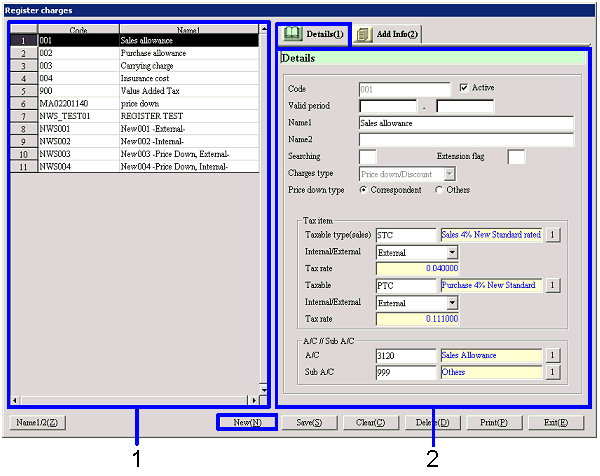
- Charges selection (or new
registration)
The list of registered charges will be
displayed. Select the charges to
setup. The information on the
charges selected will be displayed on the Details tab.
Click the "New" button when registering new charges.
-
Code, Name
The code and name of the charges will be displayed.
- Details entry
-
Code
Enter the charges code.
Make an entry with up to 20 single-byte alphanumeric.
Note that the same code as the goods code registered in [Register goods] cannot be registered.
-
Active
-
Term of
validity
-
Name 1, 2
-
Searching
-
Extension
flag
-
Charges type
Select from "Charges," "Price down/Discount," "VAT,"
and "Appreciation." Refer to [What are Charges?]
for details on each charge type.
-
Price down type
This item will appear only when "Price
down/Discount" or "Appreciation" is selected for the "Charges type."
Select the type of the price down, discount, and appreciation from "Register
correspondent" and "Others." When "Others" is selected, the items to setup the price
down (discount/appreciation) rate will appear. Make the entries.
-
Taxable type (Sales/Purchase)
Select from the taxable types registered in [Register taxable type].
For correspondents with "Detail row unit" setup as the "VAT summary unit" in [Register
correspondent], the taxable types setup for the entered charges will be
displayed in "Taxable type" on the entry screen details tab when charges are
entered in each entry.
-
Internal/External type (Sales/Purchase)
This items will not be displayed when the selected "Charges
type" is "VAT." Select from "None,"
"External," and "Internal."
-
Tax rate (Sales/Purchase)
The tax rate setup for the selected taxable type will be displayed. Changes cannot be made.
-
A/C / Sub A/C
This items will not appear when the selected "Charges type" is "VAT." Setup the A/C/Sub A/C to be used at the time of auto-journal.
Item
Setup - [Additional information] tab
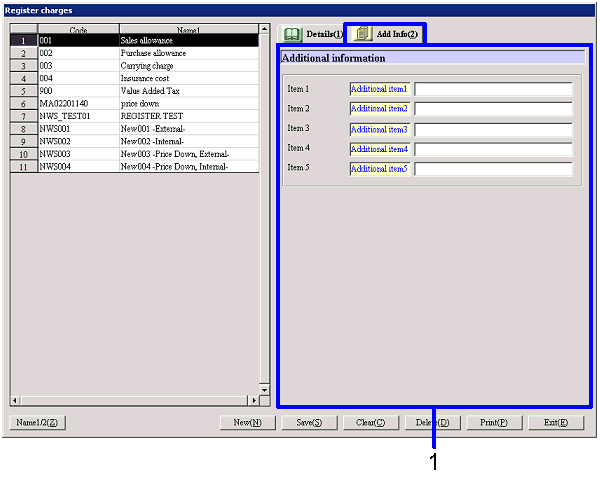
- Additional information entry
-
Item 1-5
Enter additional information. The names displayed can be changed in [Additional name
setup] in the [System custodian].
Buttons