 Register exchange rate (basic), register exchange rate (additional)
Set exchange rates between the individual
currencies registered in [Register currency].
[Register exchange rate (basic)] allows registration of four types of rates
including TTS, TTB, TTM and internal rate and other six types of rates
including Cash-S, Acceptance-S, AS-B, Usance-B, AS (None L/C) -B and Cash-B can
be registered in [Register exchange rate (additional)].
[Register exchange rate (yearly)] allows
registration of rates for one year at one time for each rate type. Use the registration screen that is
easier to use according to operation.
→ Currency
 Screen Transition
[Master management]
↓
[Common master]
↓
[Currency management]
↓
[Register exchange rate (basic)], [Register exchange rate (additional)]
↓
[Register exchange rate (basic)] screen,
[Register exchange rate (additional)] screen
Item
Setup
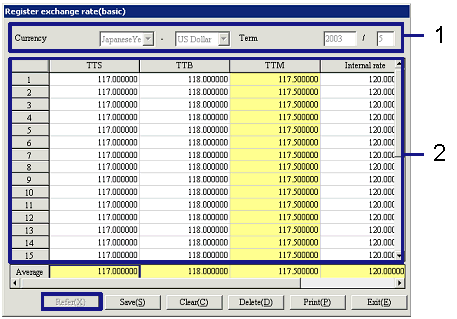
The figure above shows a sample [Register exchange rate (basic)] screen.
- Select currency and registered
date
After specifying "Currency" and "Term," click the "Reference"
button. A rate can be registered
in [Spread].
-
Currency
Select currencies from those registered with [Register
currency].
The left is the currency before conversion and the right is the currency after
conversion. Std currency is
displayed by default for the currency after conversion.
-
Term
Enter the year and month for which to register the
exchange rate.
- Enter exchange rate
Each row indicates a date in the term and each
column a rate type. When a rate
has been registered on the [Register exchange rate (yearly)] screen, the value
is displayed.
Enter the rate in the corresponding cell.
The last row shows the average rate for the individual rate type in the
term.
At entry, entering a value in any cell and pressing the Enter key copies the
same value in all of the following cells, which may be useful, for example,
when setting a fixed rate for a whole month. Entries can also be made by entering values with Excel and
collectively copying and pasting more then one cell.
-
Rates registered on the [Register
exchange rate (basic)] screen
-
TTS
-
TTB
-
TTM
TTM is automatically calculated based on TTS and TTB
(the mean of TTS and TTB) and displayed, which cannot be changed.
-
Internal rate
-
Rates registered on the [Register exchange rate (additional)] screen
-
Cash-S
-
Acceptance-S
-
AS-B
-
Usance-B
-
AS (None L/C)-B
-
Cash-B
Buttons