 Register usage ratio
Register usage ratios. The usage ratios
registered here are used for the following:
 Screen transition
[Master management]
↓
[Common master]
↓
[Trade management]
↓
[Register usage ratio]
↓
[Register usage ratio] screen
Item
setup
- Register or refer to usage
ratio
Clicking the "Reference" button after entering "Code"
displays in the spread the information registered for the specified code.
To register a new usage ratio, enter "Code," "Name," etc. and click the "Reference"
button. The spread becomes
available for making an entry.
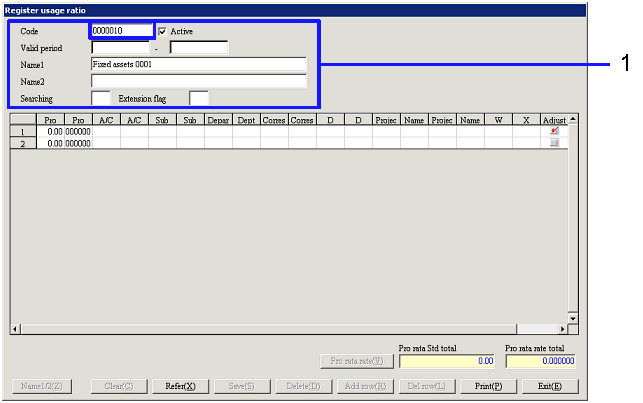
- Make entries in spread
Enter the details of each usage ratio in such a way that the total of "Pro rata
rate" becomes "1." To add/delete detail
rows, click "Add row"/"Delete row" button. After entering the details, click the
"Pro rata rate"
button. The total of pro rata Std
or pro rata rates can be checked.

-
Pro rata Std
Enter pro rata Std.
When prorating between two or more departments, for example, enter the area of
each of the departments to prorate based on the area.
-
Pro rata rate
Enter pro rata rate. Clicking the "Pro
rata rate" button calculates the result of "Pro rata Std total/Pro rata Std,"
which is displayed. For the
fraction generated as a result of calculation, adjustment is made in the detail
row with the "Adjustment" check box ON.
-
A/C code, A/C name
Enter A/C of T/F Dest.
-
Sub A/C code, Sub A/C name
Enter only if A/C has Sub A/C.
-
Department code, Dept name
-
Correspondent code, correspondent
name
-
D description code, D description
name
-
Project code 1, 2, name
-
Accounting analysis code 1, 2
-
Adjustment
Check the "Adjustment" box ON for the row in which adjustment is to be made for
the fraction of pro rata rate. By
default, the "Adjustment" box for the first detail row is ON. Check boxes for two or more rows cannot
be turned ON at the same time.
-
Pro rata Std total
The total of the pro rata Std entered is displayed.
-
Pro rata rate total
The total of the pro rata rates entered is displayed. Clicking the "Save" button when the
value is not "1" generates an error.
Buttons