 Register packing unit
Register the unit for the goods that use
packing. Only goods with the "Packing
conversion" checkboxes turned ON in [Register
goods] can be registered.
 Screen Transition
[Master management]
↓
[Logistics master]
↓
[Goods management]
↓
[Register packing unit]
↓
[Register packing unit] screen
Item
Setup
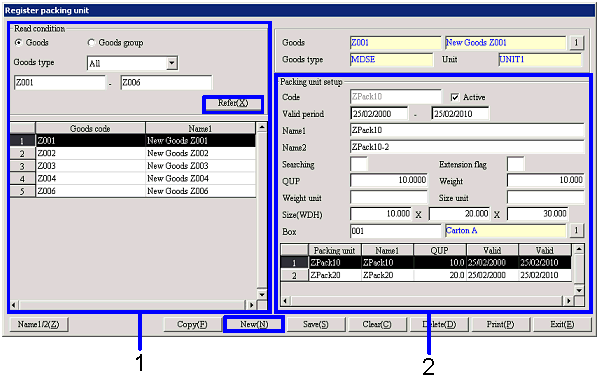
- Goods selection
When the "Refer" button is clicked, the goods with
the "Packing conversion" checkboxes ON in [Register
goods] will be listed from the goods that match the read conditions. Select the goods to setup. The names and the codes of the goods
selected will appear in "Goods name" on the right side of the screen.
-
Goods, Goods group, Code
Select the read conditions of the goods to register
and / or refer.
Goods:
Select when directly searching for goods. The range of the goods code can be specified.
Goods group:
Select the goods group, then make a selection when selecting goods with the
structure registered in that goods group.
-
Goods type
Select the type of the goods to refer "All," "MDSE,"
"Product," "Work in process," "WIP," "Raw material," "Other inventory,"
"Equipment" and "Consumables." These will be displayed only when the read condition is "Goods."
-
Code
Select the codes in accordance with the selected "Goods"/"Goods
group" and "Goods type."
-
Code, Name
The goods codes and names that match the read
conditions will be displayed.
-
Goods, Goods type, Unit
The codes, names, and the goods type of the goods
selected on the left side of the screen will be displayed.
- Packing unit setup
-
Code
Make an entry with up to 20 single-byte alphanumeric. In addition, ": (colon)" cannot be used.
-
Active
-
Term of
validity
-
Name 1, 2
In addition, ": ( colon)" cannot be used.
-
Searching
-
Extension
flag
-
QUP
Enter the QUP for the packing ("50" when there are "50 in a case"). This will appear on the packing list of
the voucher issued in the [Sales
control module].
-
Weight, Weight unit
Enter the weight and the weight unit for the packing. This will appear on the packing list of the voucher issued
in the [Sales control module].
-
Size unit, Size (WDH)
Enter the size (W [Width] × D [Depth] × H [Height]) and the size unit (cm,
inches, etc.) of the packing. This
will appear on the packing list of the voucher issued in the [Sales control module].
-
Box
Select from the boxes registered in [Register box].
[Spread]
The list of packing units that are setup
for the goods being selected will be displayed.
-
Packing unit code, Name
-
QUP
-
Term of validity (From), Term of validity (To)
Buttons