 Register warehouse/process
Register process departments to use in [Sales control
subsystem], [Purchase control subsystem] and [Products/EDI subsystem].
Entry of warehouse/process is required in the details on the entry screen of [Sales
control subsystem] and [Purchase control subsystem] even when no inventory control
takes place. Be sure to register
at least one temporary warehouse/process.
Warehouses/process departments registered here need structure registration in [Register department structure].
→ To Department
 Screen Transition
[Master management]
↓
[Common master]
↓
[Department management]
↓
[Register warehouse/process]
↓
[Register warehouse/process] screen – [Details]
tab, [Details 2/Additional information] tab
Item Setup - [Details] tab
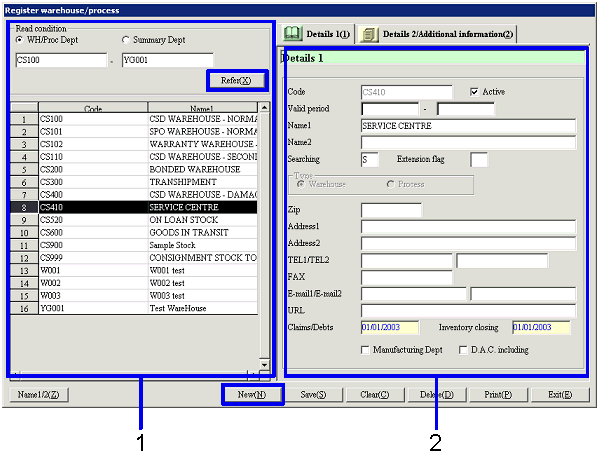
- Select warehouse/process department
or (register new warehouse/process department)
Clicking the "Reference" button lists the
warehouses/process departments that meet the read conditions. Select the warehouse/process department
to set up. The information on the
warehouse/process department selected is displayed on the Details tab.
To register a new warehouse/process department, click the "New" button.
-
Warehouse/Process Dept, summary
Dept, code
Select conditions to read departments to register or refer to.
Warehouse/Process Dept:
Select this to directly search for a warehouse/process department. A range of warehouse/process department codes can be specified.
Summary Dept:
Select this option to select a summary Dept and specify a warehouse/process
department for which structure is registered for the summary department. Select a summary Dept code.
-
Code, name
The codes and names of the warehouse/process departments are displayed.
- Enter details (1)
-
Code
Enter a code for the warehouse/process
department. Up to 20 alphanumeric
characters can be entered.
Note that the department codes registered in [Register
department] or summary department codes registered in [Register summary department cannot be used.
-
Active
-
Term of
validity
-
Name 1, 2
-
Searching
-
Extension
flag
-
Type
Enter "Warehouse" or "Process."
To use for inventory control, register as "Warehouse."
To use for process control, register as "Process."
-
Zip, address 1, address 2
Enter the zip and address of the warehouse/process
Dept as required.
-
TEL 1/TEL 2, FAX
Enter the telephone No. and FAX No. of the warehouse/process Dept as required.
-
E-mail 1/E-mail 2, URL
Enter the E-mail address and URL of the warehouse/process
Dept as required.
-
Claims/Debts closing date
For new registration, enter the closing date of the
previous term.
For reference, the latest claims/debts closing date as in [Claims/Debts
closing] of [Closing control module] is displayed; the date cannot be
changed.
-
Inventory closing date
For new registration, enter the closing date of the
previous term.
For reference, the latest inventory closing date as in [Inventory
closing] of [Closing control module] is displayed; the date cannot be
changed.
-
Manufacturing Dept
If the department to register is manufacturing Dept,
check this check box. Of the A/C
registered as "Manufacturing cost A/C" in the entry, only the departments with
the check box ON can be entered.
-
Check the check box (manufacturing
Dept) → Both cost of sales and sales and general can be entered.
-
Uncheck the check box (non-manufacturing
Dept) → Cost of sales cannot be entered.
-
D.A.C. INCLUDING
To use as a warehouse/process department of
deferred auto-journal depreciation in [Deferred account control module],
check the check box.
Item Setup - [Details 2/Additional information] tab
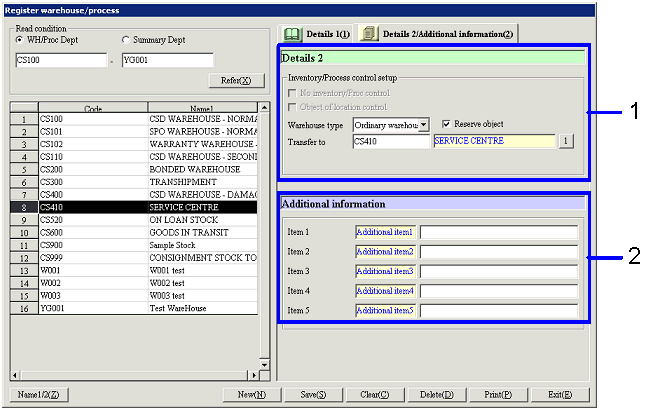
- Enter details (2)
-
No inventory/process control
Checking this check box allows the
warehouse/process Dept to be used for entry of warehouse/process but excludes
from the object of inventory forms (except for lists) and inventory balance
update.
This check box can be checked only when "Type" is "Warehouse" and "Warehouse
type" is not "Direct warehouse."
-
Object of location control
Checking this box includes the
warehouse/process Dept in the object of location control, which allows detailed
control of the warehouse for each location registered in [Register location] of [Logistics
master module].
This box can be checked only when "Type" is "Warehouse" and "Warehouse type" is
not "Direct warehouse."
-
Warehouse type
Select one of the following types:
Ordinary warehouse:
Ordinary warehouse to use for incoming/outgoing goods.
Warehouse inspecting:
Warehouse to use for goods in process of inspection. Select this option to exclude the
warehouse from reservation, etc.
Direct warehouse:
Warehouse to use for control of goods for direct shipping. Only warehouses of this type can be
specified as "Direct warehouse" in [Direct shipping entry]
of [Shipping control module].
Bond warehouse:
Warehouse for storing bonded cargo.
-
Reserve object
Checking the box allows reservation of ordered goods from the warehouse/process
Dept. This box can be checked only
when "Warehouse type" is "Ordinary warehouse" or "Bond warehouse."
-
Transfer to warehouse
Register the warehouse/process department to
be displayed by default as the destination of transfer from the
warehouse/process department when making purchase entries based on arriving
data.
When the registered transfer to warehouse is registered as "Object of location
control," "Transfer to location" can be specified.
-
Transfer to location
Register the location destination to be
displayed by default as the destination of transfer if the warehouse/process
department is the object of location control when making purchase entries based
on arriving data.
- Enter additional information
Buttons
-
Name1/2
-
New
-
Save
Even warehouse/process departments that have been saved cannot be used
without structure registered in [Register
department structure] unless they are directly assigned warehouse/process departments
with "Authority to update," "Authority to approve" or "Authority to refer" in [Employee setup]
in [System custodian] for a specific employee. This is because warehouse/process departments for which
structure is not registered do not come under authority of any operator unless
they are directly specified with "Authority to update," "Authority to approve"
or "Authority to refer" in [Employee setup].
-
Clear
-
Delete
-
Print
-
Exit