 Register A/C and Sub A/C
Register A/C and Sub A/C
The process registers
A/C and sub A/C for use in A.S.I.A.
Irrespective of whether A/C and sub A/C are registered, they cannot be
used unless they are set for property.
Therefore, you must register A/C property in [Register A/C property].
→ A/C
 Screen Transition
[Master management]
↓
[Accounting master]
↓
[Accounting management]
↓
[Register A/C and Sub A/C]
↓
[Register A/C and Sub A/C] screen → [A/C], [Sub A/C] tab
Item Setup
- [A/C] tab
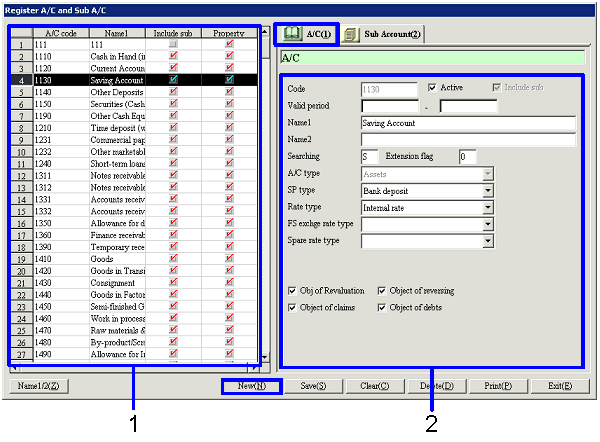
|
Dr/Cr |
A/C type |
|
Dr Balance A/C |
Assets |
|
Cost of sales |
|
|
Sales and general |
|
|
Non-operating expenses |
|
|
Extraordinary loss |
|
|
Profit adjustment (P/L) |
|
|
Cr Balance A/C |
Liability |
|
Capital |
|
|
Sales |
|
|
Non-operating profit |
|
|
SP gain |
|
Setup, Entry |
Selectable SP Type of A/C |
|
Setup of cash A/C and sub A/C in [Parameter Setup] |
Cash |
|
Setup of A/C and sub A/C for each bank account in [Register bank account] |
Bank deposit |
|
Entry of Dr A/C in [Receiving voucher] and Cr A/C in [Payment voucher] in [General accounting/multi-currency accounting module] |
Cash, bank deposit |
|
Range of A/C and sub A/C for output in [Cash daybook (standard/by currency)] and [Bank daybook (standard/by currency)] in [General accounting/multi-currency accounting module] |
Cash, bank deposit |
|
A/C and sub A/C for which entry is prohibited if "Transfer voucher cash entry prohibit" is set On with [Transfer voucher (std/foreign currency)] in the [General accounting/multi-currency accounting module] |
Cash, bank deposit |
|
Cr A/C (Sales A/C, Purchase Return A/C, Out Cr Temporary A/C) in the cost of sales method when inventory auto-journalizing |
Inventory |
|
Presently unused |
Monetary assets, monetary debts |
|
Dr A/C (Sales Return A/C, Purchase A/C, Incoming Dr Temporary A/C) in the cost of sales method when inventory auto-journalizing |
Inventory |
|
A/C to use if there is a negative difference in the implemented inventory |
Inventory |
|
Cost A/C for cost of sales |
Inventory |
|
Used in the [Fixed assets module] |
Fixed assets |
|
Used in the [Construction in progress module] |
Construction in progress account |
|
Currently unused |
Deferred assets |
|
Used in the [Deferred accounts control module], [Uncollected control module] and [Unpaid control module] |
Prepaid expenses, deferred revenue |
|
Setup of the previous year profit carry-forward A/C in [Annual closing parameter setup] in the [Closing control module] |
Previous year profit carry-forward (one A/C only) |
|
A/C to use for commission A/C in the [Notes receivable module] when auto-journalizing |
Commission paid |
|
A/C to use for exchange gain and loss A/C in the [Multi-currency accounting module] when evaluating FC |
Exchange loss, exchange gain |
|
A/C to use for exchange gain and loss A/C in the [Claims control module] and [Debts control module] when settling or auto-journalizing |
Exchange loss, exchange gain |
|
A/C to use for entering VAT in the [Bank account control module] |
Dr side VAT, Cr side VAT |
|
Use in the [Leased assets module] |
Lease |
|
FS Exchange Rate Type |
Use |
|
Rate at acquisition |
Use the rate at acquisition as the exchange rate when creating financial statements. |
|
Rate at settlement |
Use the rate at settlement as the exchange rate when creating financial statements. |
|
Average rate |
Use the average rate during the term as an exchange when creating financial statements. |
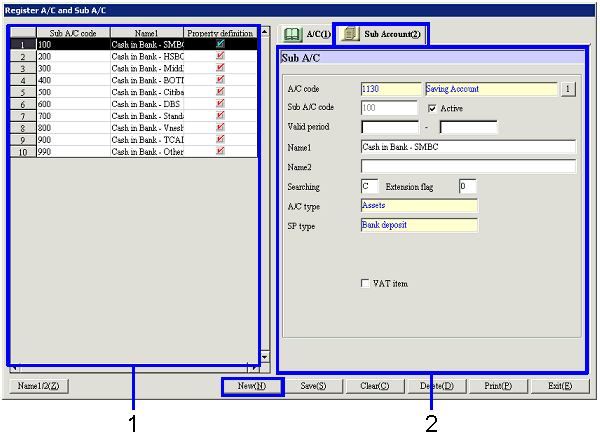
Buttons
Notes: